
After reading a lot on TrueCrypt and SSD performance, it’s time to share the sum of the knowledge gathered with everyone else 😀 It has been written a lot on that topic, especially concerning the interoperability of TrueCrypt, ATA trim-command and wear leveling in connection with durability and performance issues of SSDs.
Performance and durability issues with (fully) encrypted SSDs
Especially in connection with the ATA-TRIM command, there are rumors out there that performance of encrypted SSDs degrades over time even if SSD-firmware and OS support the ATA-Trim command and newer versions of TrueCrypt implemented some SSD-specific optimizations. This guess is based upon the (unproven) hypothesis, that due to the way TrueCrypt handles writes to the SSD, TRIM commands may not reach the SSD controller at all and thus had no (positive) effect on drive performance degradation over time.
Worse: this is also of concern with regard to durability of (fully) encrypted SSDs. As wear leveling mechanisms can not make use of any blocks in partitions being encrypted with TrueCrypt, the SSD controller could only use some reserved overhead space (some reserved blocks dedicated to wear leveling) which will be heavily used and therefore become corrupt quite early. To prevent that, you should leave some unpartitioned space on your SSD if you plan to fully encrypt it as the controller can use this space for wear leveling.
Update: There are good news from AnandTech. They guys over there found out, that leaving a whopping 25% of the total capacity of your SSD unassigned may improve your performance by an order of magnitude, especially if the assigned space on your SSD is encrypted or nearly completely filled with user data (which basically turns out to have the same effects).
Some benchmarking
However, here are some numbers from two different systems. On both, I have an Intel Postville G2 160 GB installed, both drives can considered to be „unused“ (fresh install). Both drives / systems are running in AHCI mode, the firmware has been upgraded to support the ATA-trim command. For encryption, I chose TrueCrypt 6.3a using AES encryption in both cases.
Desktop system (Windows 7 x64): Intel dual Core CPU (Core 2 Duo E8400, 3 GHz@3.6GHz), 4 Gigs of RAM and an ICH10R southbridge chipset.
Notebook system (Windows Vista x86): Intel dual core CPU (T8100, 2,1 GHz@2,1 GHz), 4 Gigs of RAM and an ICH8 southbridge (benchmark run in ‚max. performance‘ energy management setting).
Unencrypted vs. AES-encrypted SSD performance (desktop system)

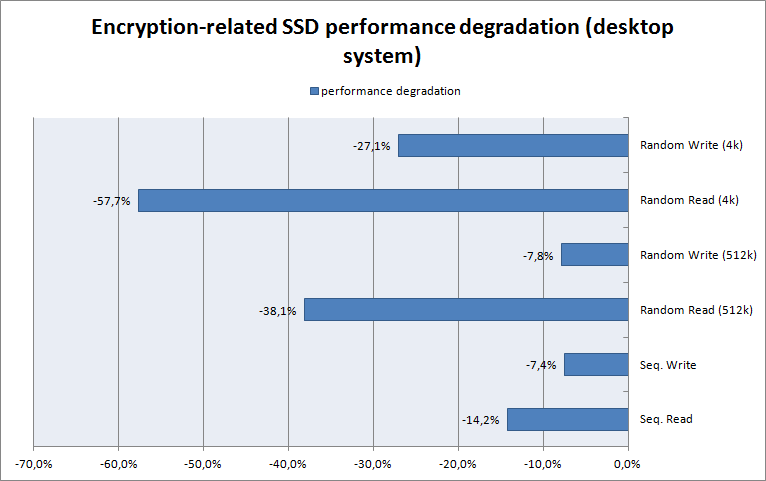
As you can see, there is a significant difference in SSD performance between an unencrypted and an AES-encrypted SSD. There seems to be a negative correlation between random transfer block size and performance degradation, resulting in significant performance degradation up to 58% if it comes to 4k random reads. Interestingly, SSD performance especially suffers in random read scenarios, which I as a layperson have no explanation for (your turn :)). If I should make a guess, I would blame it to the limited capabilities even of desktop-class chipsets in order to handle thousands IOPS an Intel SSD is able to offer (compared to some 50-100 in standard HDDs).
Unencrypted vs. AES-encrypted SSD performance (notebook system)
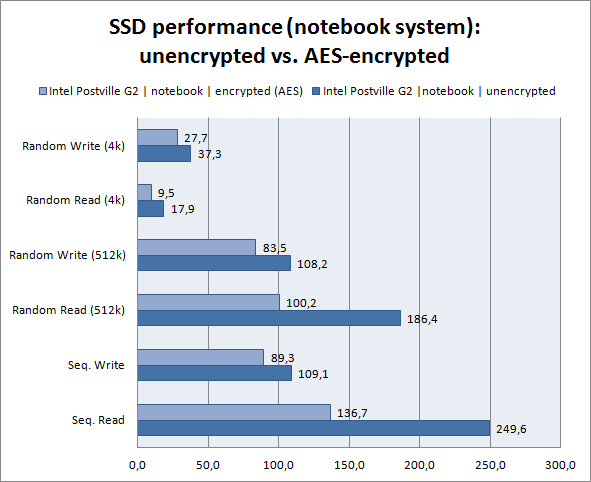

As you can see from the figures above, encryption-related SSD performance degradation on notebook hardware is less significant when it comes to small block random transfers compared to 512k block random transfers or sequential transfers. Given a bandwith of 145 MB/s my T8100 CPU can handle in AES mode (TrueCrypt benchmarks), this seems to be caused by the CPU limitating transfer speed.
After all, there is a non-objective difference between raw performance numbers and „felt performance“ with a fully encrypted SSD on notebook hardware: the performance difference is noticeable, nevertheless by far not as significant as the numbers indicate. And always keep in mind, that even 9,5 / 27,7 MB/s in 4k random reads / writes outperform any HDD out there by an order of magnitude, whereas sequential transfer performance remains on average desktop class HDD hardware level. Quite a good deal if you ask me.
The encryption procedure and (theoretical) issues
Even if the TrueCrypt website warns you about encrypting any drive using wear leveling mechanisms ‚on the fly‘, exactly that went well for me. Nevertheless, before encrypting I chose to draw an image from my SSD – just in case 🙂
Further SSD performance tuning for Windows Vista
There is an excellent guide on SSD performance tuning under Vista in the OCZ forums, as Microsoft’s OS does not support many SSD related functions natively. Those hints tend to have more influence on durability than they have on read / write performance itself.
Further Articles on „TrueCrypt“ and „Encryption“ (Benchmarks)
- HardwareLuxx: SSD Disk Encryption – TrueCrypt vs. BitLocker vs. DiskCryptor (German)
- siyuz.net: Truecrypt 7.0a on SSD